How to get the WhatsApp blue badge for your hotel number
The blue badge on a hotel's WhatsApp number is requested from one button in WhatsApp Manager, and that button stays greyed out until five things are true about the number. Most…

The blue badge on a hotel's WhatsApp number is requested from one button in WhatsApp Manager, and that button stays greyed out until five things are true about the number. Most hotels that ask why they cannot get the badge are missing one of the five, and WhatsApp Manager tells you which one if you hover over the button.
This matters more than it used to. Since 2026 the badge is also the gate to the WhatsApp Groups API: a number without it cannot open a group with guests at all.
What the badge is, and what it is not
An Official Business Account, OBA in Meta's documents, is a WhatsApp number that shows a blue checkmark beside the business name in every chat. Meta grants it after reviewing that the business is genuine and notable.
It is not the same thing as Meta Business Verification. Business Verification confirms the company behind a Business Manager account with documents. It is a prerequisite for the badge, and it is where most hotels stop, believing the green "verified" label in Business Manager means the WhatsApp number is verified. It does not. A hotel can be fully business-verified and still have no badge, and the Groups API will still refuse it.
The five requirements
Meta's Official Business Account documentation lists the conditions a number must meet before a request is considered:
- The business portfolio that owns the number has passed Meta Business Verification.
- The number's display name has been approved.
- Two-step verification is enabled on the number.
- The number has been on the WhatsApp Business Platform for at least 30 days.
- The business complies with the WhatsApp Business Messaging Policy.
There is a sixth condition that is not in the documentation. On a number whose messaging limit is still at the entry tier of 250 business-initiated conversations a day, the Submit request button is disabled and the tooltip reads "Increase your business limits to become eligible for an Official Business Account". Business Verification lifts the tier to 2,000, so in practice requirement one also clears this.
One more before any of these: the number must be a Cloud API number, connected through the WhatsApp Business API rather than the app. A number in coexistence with the WhatsApp Business app on a phone is not eligible for groups, and the badge request on such a number leads nowhere useful. Move it first.
Step by step in WhatsApp Manager
1. Verify the business
This is done by the hotel in its own Business Manager, under Settings, Security Center, Business verification. Meta asks for a company registration document or a utility bill showing the legal name and address. It takes a few days. If a partner manages your WhatsApp number for you, this step is still yours, because the documents are the hotel's.
2. Open the number
In WhatsApp Manager go to Account tools, Phone numbers, pick the right WhatsApp Business Account in the top-right selector, and click the gear icon on the number. The list already tells you something: a clock icon and "In review" under the name means the display name is not yet approved.
3. Get the display name approved
On the Profile tab, under Display name. The name must match the business name Meta knows. A hotel name with the city added is fine. A generic word on its own is not. Review takes minutes to days.
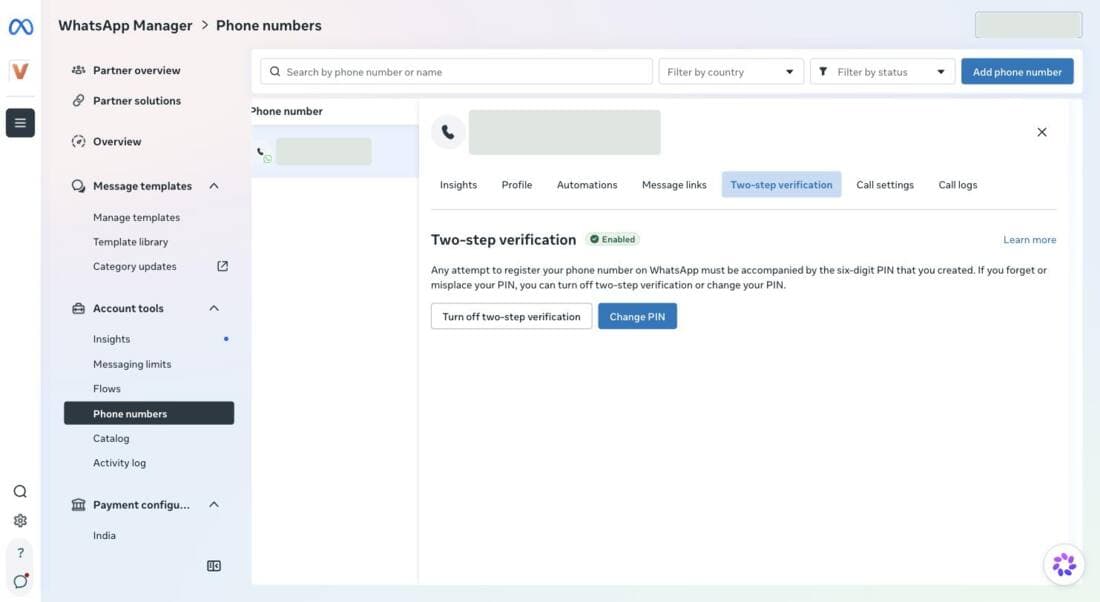
4. Turn on two-step verification
The Two-step verification tab. Choose a six-digit PIN and keep it somewhere the hotel can find it. Numbers onboarded by a partner usually have this switched on already; check that the tab says "Enabled".
5. Check the messaging limit
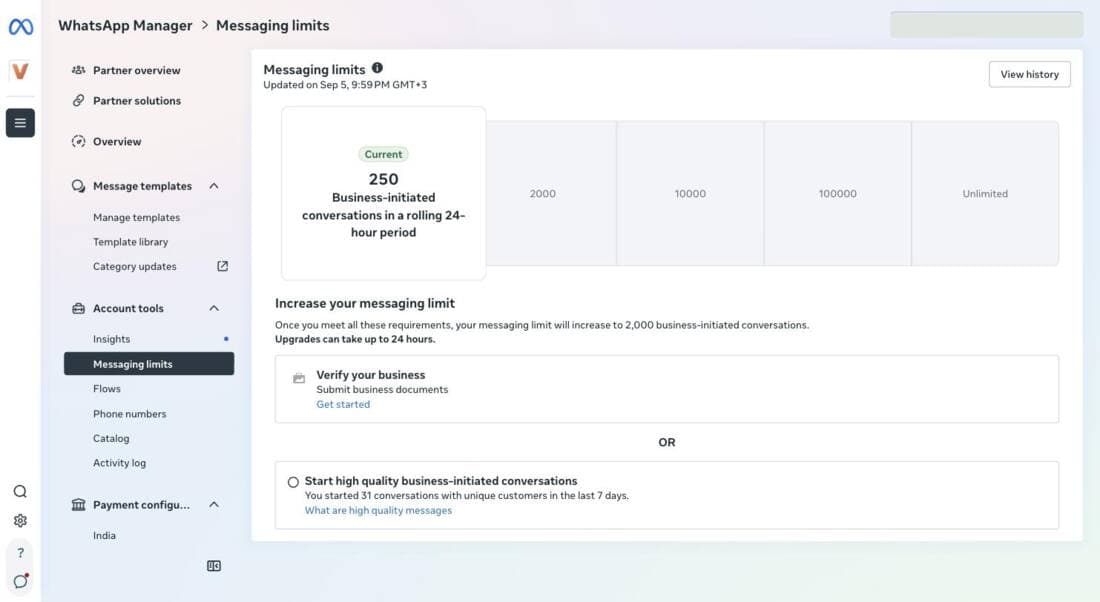
Account tools, Messaging limits. At 250 the page names the two ways up: verify the business, or start enough high-quality business-initiated conversations. After verification the tier rises to 2,000 within about 24 hours.
6. Fill in the business profile
Also on the Profile tab: picture, category, description, address, email, website. It is not a listed requirement, but the reviewer sees the profile the way a guest does. Most hotel numbers we look at have no picture and no website. Add the logo, one line of description, the address and the site.
7. Submit the request
Profile tab, Official business account section, Submit request. When the button is active, the request goes to Meta with no further form. When it is greyed out, hover over it. The two messages we see most:
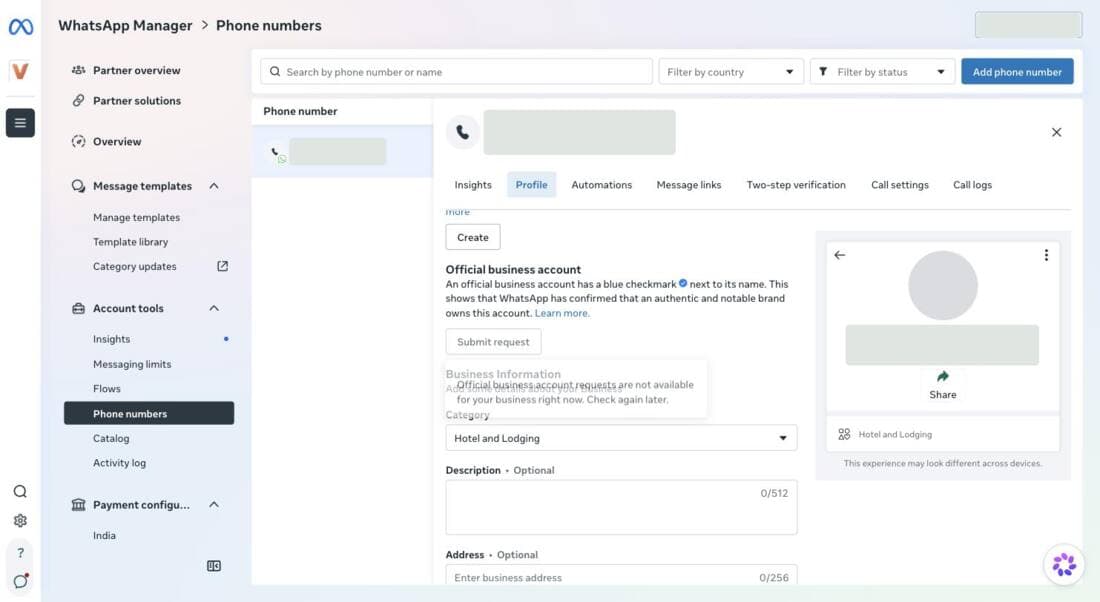
"Requests are not available for your business right now" usually means the display name is still in review, or the number is inside its first 30 days.
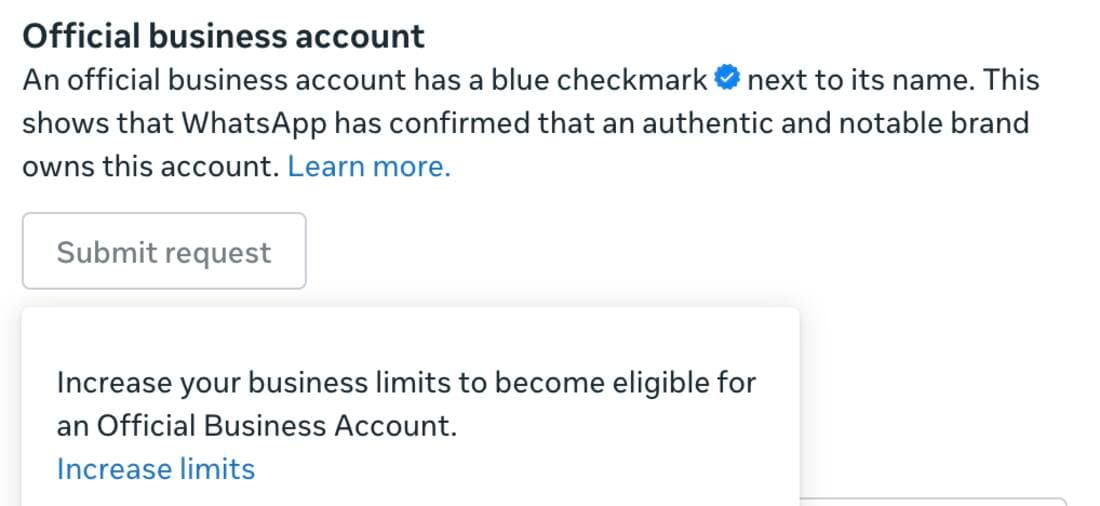
"Increase your business limits" means the messaging tier is the blocker, which almost always means the business is not yet verified.
8. Confirm it landed
The badge shows up as a field on the number in the API: `is_official_business_account` on the phone number object. A partner platform can read it and show it to you. Once it is true, groups are enabled on the number automatically. There is nothing else to request.
What we learned the hard way
When we first tested the Groups API on two hotel numbers in September 2026, both came back with error 131215, "not eligible to access Groups APIs". Both were on the Cloud API, both had every documented webhook subscribed, and we had assumed at least one carried the badge. We opened a case with Meta support. The reply was that neither number had Official Business Account status, and that groups switch on by themselves once a number does.
The lesson is that the badge is checkable, and it should be checked before anything else. The API field above says true or false. Asking the hotel whether it "is verified" gets the Business Manager answer, which is the wrong one.
Notability, the part you cannot shortcut
Meta's review weighs whether the business is notable: a brand people outside its own customers would recognise, with independent press or reference coverage. Chains and well-known resorts pass. A twelve-room guesthouse with no coverage usually does not on the first attempt, and can try again after 30 days. Filling the profile, having a working website with the same name and address, and being listed on the major booking sites all help the reviewer find the business. Nothing in this guide substitutes for that.
The badge also assumes the number is on the official platform rather than a handset at reception. If that is not settled yet, start with the app or the official platform.
Common questions
What is the WhatsApp blue tick (blue badge)?
The blue checkmark next to a business name on WhatsApp marks an Official Business Account. Meta grants it after confirming the business is authentic and notable. It is the highest level of verification a WhatsApp number can have, and it is separate from Meta Business Verification of the company, which is one of its prerequisites.
What does a hotel need before requesting the badge?
A Cloud API number, not one in coexistence with the WhatsApp Business app; Meta Business Verification of the company; an approved display name; two-step verification switched on; and at least thirty days on the WhatsApp Business Platform. In WhatsApp Manager the request button also stays disabled while the messaging limit is at the entry tier of 250 conversations a day.
Where is the request submitted?
In WhatsApp Manager, under Account tools, Phone numbers, then the gear icon on the number, the Profile tab, and the Official business account section. The button is called Submit request. When it is greyed out, hovering over it shows the reason.
How long does the review take, and what if it is rejected?
Meta does not publish a turnaround; requests we have seen take days to a few weeks. A rejected request can be submitted again after thirty days. The most common rejection reason is notability, meaning Meta could not find independent coverage of the business.